

Shortcuts 1–9
The first nine tiles show a keycap: typing the number is enough to add an item.
The till is the heart of Tindigo. Big tiles, search with F2, table or counter sales, and a bill that always adds up — categories on the left, shortcut tiles in the middle, the bill on the right.
Do you want to add extra tills or locations? Then you can — you scale per venue, module by module.
No deep menus, just one screen where everything sits logically — and on the right you see the bill at a glance.
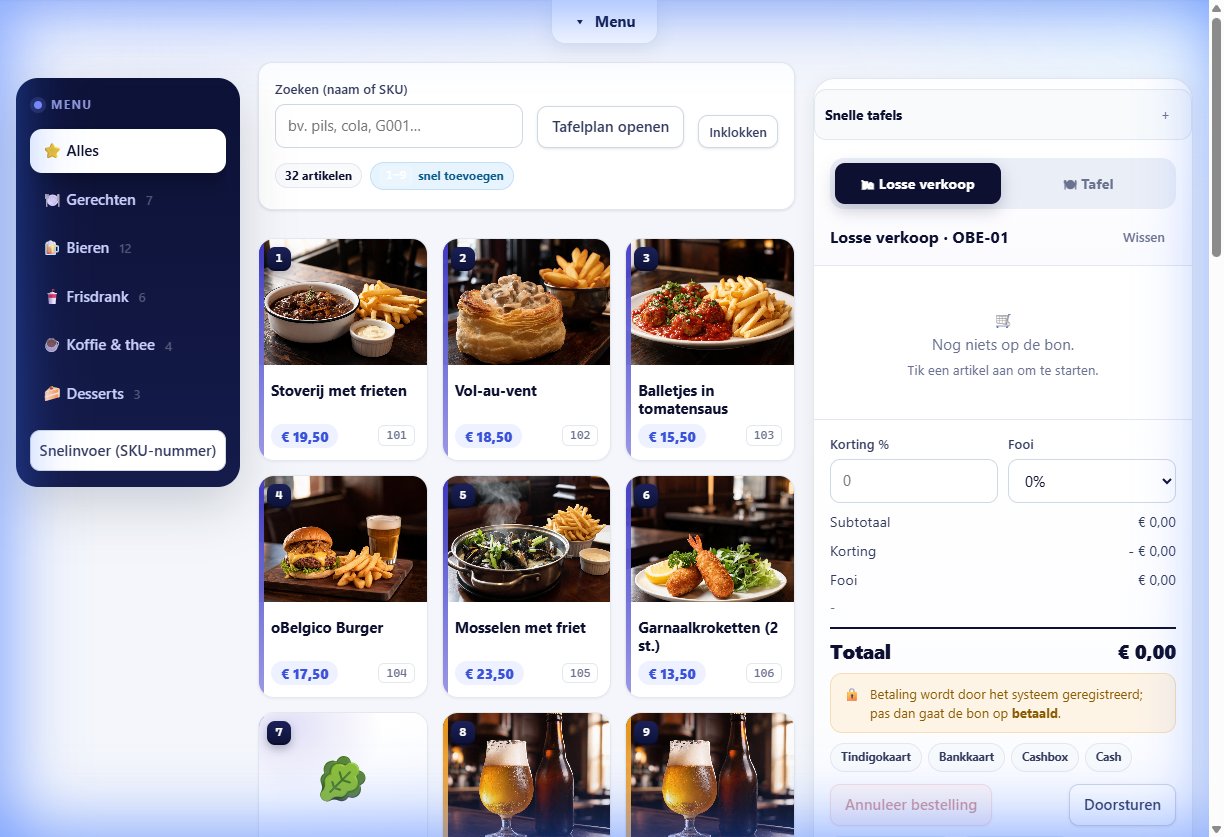
The first nine tiles show a keycap: typing the number is enough to add an item.
Colour dots and counts per category, always visible on the left.
Lines, tip, discount and totals in a fixed spot — no scrolling or searching.
Tindigo card, bank card, cash box or cash: the channels are ready under the bill.
Order in seconds and keep track of the table. Add a tip or discount, split a bill or move a table — without losing your order.
Set up your entire menu in bulk and keep it up to date without manual work.
Load items via CSV or JSON. Existing SKUs are updated, new ones added, unknown categories created automatically.
Large/small, with/without, combo items and price lists per branch.
Export your catalogue or start from a ready-made template.
Rates configurable per product and per date — crucial given the 2026 VAT changes.
Cashier, manager or owner: everyone sees and does only what they are allowed to.
Statutory details, unique ticket number, date and time, VAT per rate.
The same engine works for the bar, the table, the food truck and the event stand.
Fast counter sales, rounds and tiles for busy moments.
For barsTables, courses and kitchen tickets that follow the service.
For restaurantsMobile sales on any device, even if the network drops.
For eventsWe set up a demo with your items and tables.
3 months free on every plan